Skip to content

Printing mistakes are the most common problem when buying custom reusable bags. Many buyers do not check the printing until the bags arrive, and this causes panic. You need to know if the bags represent your brand correctly.
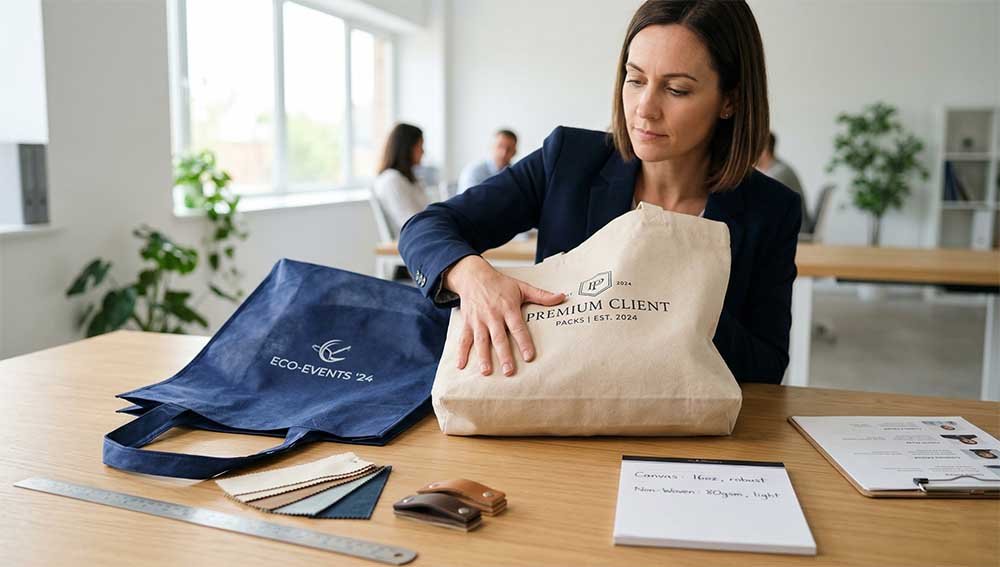
To check accuracy, compare a signed proof to random bags from the shipment. Inspect the samples for alignment, size, color, and sharpness. You should also check durability by rubbing or folding the print. Use a simple checklist and tools like a ruler and good lighting for consistent results.

Many people think printing errors are just bad luck, but they usually happen because of unclear standards. We will explain how to fix this.
WHY does reusable bag printing differ from the design file?
Your design looks perfect on your computer screen. However, the actual printed bag often looks different, and this confuses many buyers.
Differences happen because screens show colors with light (RGB), but printers use ink (CMYK). Also, materials like cotton or canvas absorb ink differently than paper or screens do. These physical factors change how the final print looks compared to the digital file.

You must understand the root causes of these differences to manage your expectations. First, there is a natural difference between digital colors and ink colors. A computer screen emits light, which makes colors look bright and vibrant. A bag reflects light, which makes colors look flatter or darker. This is a basic rule of physics.
Second, the material of the bag changes the result. A cotton bag acts like a sponge. It soaks up the ink, so the edges of lines might look soft. A non-woven bag or a laminated bag has a smooth surface. The ink sits on top, so the colors look sharper. If you switch materials, the same logo will look different.
Third, the printing method matters. Screen printing places thick ink on the surface. Heat transfer printing presses a digital image onto the fabric. Each method has limitations. The biggest reason for disappointment is not having a clear standard before starting. If you do not agree on what "correct" looks like, the factory will guess. This leads to errors that are hard to fix later.
WHAT should you compare between the proof and the printed bag?
You receive a sample bag from the factory. It looks okay at first glance, but you need to be sure.
You must compare specific details like color codes, logo size, and print position. Check that the lines are clear and the text is readable. The most important thing is that the bag matches the signed physical sample you approved earlier.

You need a systematic approach to compare the proof and the final product. Do not just look at the bag and say it is "good." You need to break down the design into separate parts.
Start with the color. Does it match the Pantone number you selected? Is the color solid, or does it look washed out? Next, look at the size of the logo. Designers specify the size in the file, but sometimes production changes it. Verify that the ratio is correct. The logo should not look squashed or stretched.
Then, check the position. Is the logo in the center? Is it too close to the seams? A unified reference point is necessary. Finally, check the clarity. Small text is difficult to print on rough fabrics. Make sure the letters are distinct and do not bleed into each other.
| Item to Check | What to Look For | Common Issue |
|---|---|---|
| Cor | Exact Pantone match | Color is too dark or faded |
| Tamanho | Correct dimensions | Logo is smaller than approved |
| Position | Distance from top hem | Logo is crooked or too low |
| Clarity | Sharp edges on text | Small letters are blurry |
HOW can buyers check color, size, and logo placement?
You know what to check. Now you need the right tools and methods to do it accurately.
Use physical tools instead of just your eyes. Measure the position with a ruler. Compare colors under natural daylight, not office lights. Look closely at the edges of the print to see the details clearly.

You cannot rely on a quick look to judge accuracy. You need to use objective methods. First, get a ruler. Measure the distance from the top hem of the bag to the top of the logo. Do this for several bags. The distance should be consistent. If one bag has the logo 5cm down and another is 8cm down, the production is unstable.
Next, check the color in the right environment. Indoor office lights can be yellow or blue. This changes how you see color. Take the bag and your color swatch outside into natural daylight. Place them side by side. This is the only way to see the true color match.
You also need to check the reverse side if the bag has printing on both sides. Sometimes the back print is lower than the front print. Inspect the edges of the logo. The ink should be crisp. If you see "ghosting" (a double image) or fuzzy edges, the screen moved during printing. For multi-color designs, check that the colors line up perfectly. There should be no white gaps between two colors.
WHAT printing issues show poor quality or mismatch?
Some defects are obvious, but others are subtle. You need to identify which errors are unacceptable.
Poor quality shows as wrong colors, distorted logos, or ink that peels off. If the print is not in the right place, or if the edges are messy, this is a mismatch. These issues make your brand look unprofessional.

You need to recognize specific defects to give clear feedback to the factory. A major issue is color distortion. This means the red is too orange, or the blue is too purple. This hurts brand recognition. Another issue is geometric distortion. This happens when the logo is stretched horizontally or vertically. The circle becomes an oval. This usually happens when the artwork file was resized incorrectly.
Placement errors are also common. If the logo is crooked, the bag looks cheap. You can accept a small variance, maybe 3mm to 5mm, but anything more is visible to the eye. Look for "bleeding." This is when the ink spreads into the fabric fibers. It makes fine lines look like blobs.
Also, check for mechanical defects. "Pinholes" are small unprinted dots in a solid block of color. "Banding" looks like stripes in a gradient. These show that the machine was not set up correctly. Finally, perform a simple durability test. Rub the print with a white cloth. If color comes off, the ink is not cured. Bend the bag. If the print cracks, the quality is low. These physical failures are just as bad as visual mismatches.
HOW can printing accuracy be confirmed before mass production?
Fixing mistakes after the bags are made is impossible. You must confirm accuracy before the machines start running.
You must check every detail during the sample stage. Make the physical sample the final standard, not the computer file. Tell the factory that mass production must match this sample. Write this requirement down to avoid arguments later.

The most effective way to control risk is to shift your focus to the pre-production stage. Many buyers make the mistake of approving a digital proof and thinking that is enough. It is not. You must ask for a physical pre-production sample (PPS).
When you get this sample, inspect it strictly. Use all the methods we discussed: measure it, check the color in sunlight, and test the durability. If the sample is wrong, do not approve it. Ask for a new one. Once the sample is perfect, sign it. Send a photo of the signed sample to the factory. Tell them, "This is the standard."
This creates a "Golden Sample." In the future, if the mass production looks different, you have proof. You can say, "It does not match the Golden Sample." This is much stronger than saying, "It does not look like the PDF." Professional buyers know that disputes are rarely about quality; they are about standards. By setting the standard early with a physical sample, you protect your money and your timeline.
Conclusão
Printing accuracy requires clear standards and physical checks. Use a checklist to verify color, size, and placement against a signed sample. This ensures your custom bags represent your brand perfectly.
Frequently Asked Questions
Q: What is the industry standard for acceptable printing position error?
A: Most manufacturers follow a standard tolerance of ±5mm to 10mm for position. Fabric is flexible and moves during the printing process by hand. If the shift is less than 5mm, it is usually considered a pass in the textile industry.
Q: Can I print over the seams or the bottom gusset of the bag?
A: It is risky. The uneven thickness of the seam prevents the screen from laying flat against the fabric. This causes ink gaps or thick blobs. We recommend keeping your design at least 2cm away from any seams or hems for the best accuracy.
Q: Why does my logo look different on a Jute bag compared to a Canvas bag?
A: Jute has a very rough and open texture. The ink breaks up over the fibers, which makes the print look "distressed" or vintage. Canvas is tighter, so it holds fine details better. You cannot use the same standard for rough fabrics as you do for smooth ones.
Q: What is the minimum font size I should use to ensure the text is readable?
A: We suggest a font size of at least 10 points for screen printing on canvas or cotton. If the text is smaller, the ink may close up the loops in letters like "e" and "a" during production. For bold fonts, you might go slightly smaller, but thin lines will break.
Q: Should I use Pantone Coated (C) or Uncoated (U) codes for fabric bags?
A: Uncoated (U) codes are better for cotton and canvas bags. These fabrics absorb ink and have a matte finish, just like uncoated paper. If you choose a Coated (C) code, the actual print on the bag will look much duller than your shiny reference chip.
Q: What if I do not have a Pantone color code for my logo?
A: The factory will pick a color based on what they see on their monitor, which is dangerous. You can send a physical item that has your brand color on it, like a business card or a letterhead. The factory can scan this item to match the ink color physically.
Q: Can I use third-party inspection companies like SGS or Intertek for this?
A: Yes. You can hire them to perform a "During Production Check" or "Final Random Inspection." You must provide them with your approved "Golden Sample" and a specification sheet. Without these reference points, the inspector cannot judge if the print is correct.
Q: What is AQL and how does it apply to printing defects?
A: AQL stands for Acceptable Quality Limit. It is a statistical table used to decide if a batch passes. For promotional bags, an AQL of 2.5 is common for major defects (like wrong logos). This means if you buy 1,000 bags, you accept that a small number (e.g., 2-3%) might have minor issues.
Q: Does eco-friendly ink affect the printing accuracy?
A: Water-based eco-inks are thinner than traditional plastic-based (Plastisol) inks. They feel softer but are less opaque. If you print a light color on a dark bag using eco-ink, the bag color might show through. You may need a double layer of ink, which can slightly affect line sharpness.
Q: How do I check accuracy if I order a full-color photo print?
A: For photos, you need to check the resolution, not just the color. Look for "pixelation," where the image looks like small squares. This happens if the source file was low quality. Also, check that the transition between colors is smooth and not banded like a rainbow.

 Português
  English
  Deutsch
  Español
  Русский
  العربية
  Français
  Italiano
  日本語
日本語  한국어
한국어  Dansk
Dansk